These are curated "best prompts" that work reliably for common use cases. Each prompt follows our tested 5-step structure with built-in constraints. Copy-paste and replace bracketed fields [like this] with your specifics.
2025 Trending Styles
HOTViral styles taking over social media in 2025
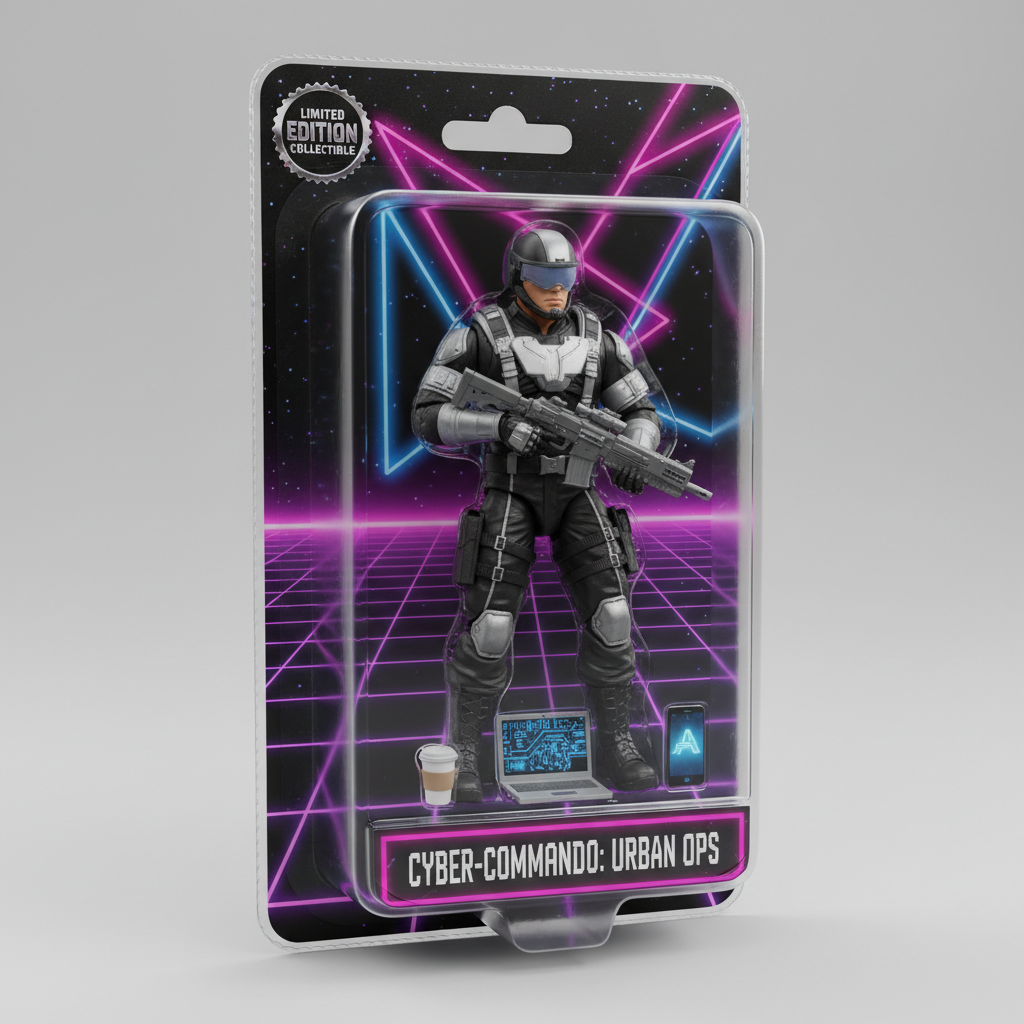
AI Action Figure
#1 ViralTransform yourself into a collectible boxed action figure with accessories. Trending on TikTok and Instagram.
Create a 3D action figure of me in transparent blister packaging. Include miniature accessories like [coffee cup, laptop, phone]. Retro toy box style, "Limited Edition" aesthetic, studio lighting, collectible quality, no text on figure.
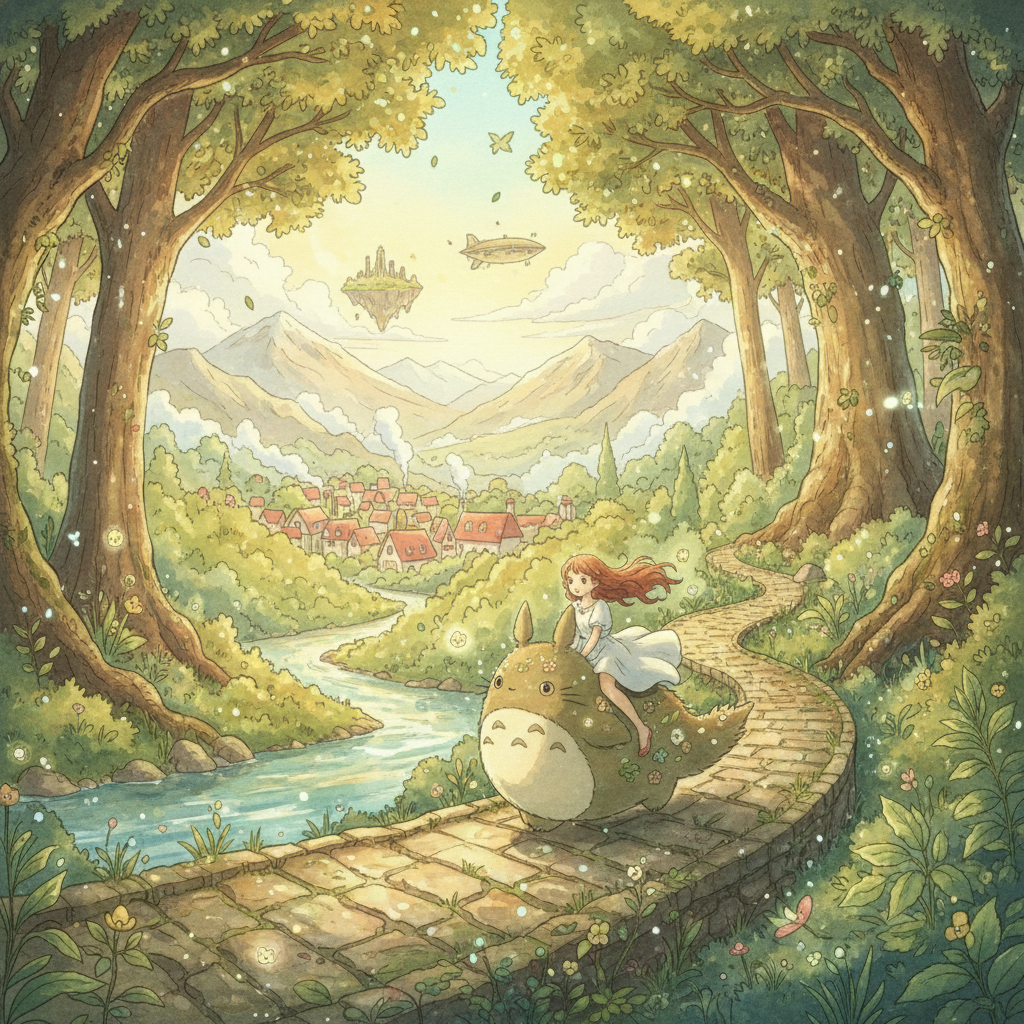
Ghibli Style
AnimeTransform photos into Studio Ghibli anime style. Soft watercolors, whimsical atmosphere, Miyazaki vibes.
Transform into Studio Ghibli anime style. Soft watercolor aesthetic, warm lighting, whimsical atmosphere, hand-painted look, lush nature background, dreamlike nostalgic mood, Miyazaki-inspired, 4K detail.
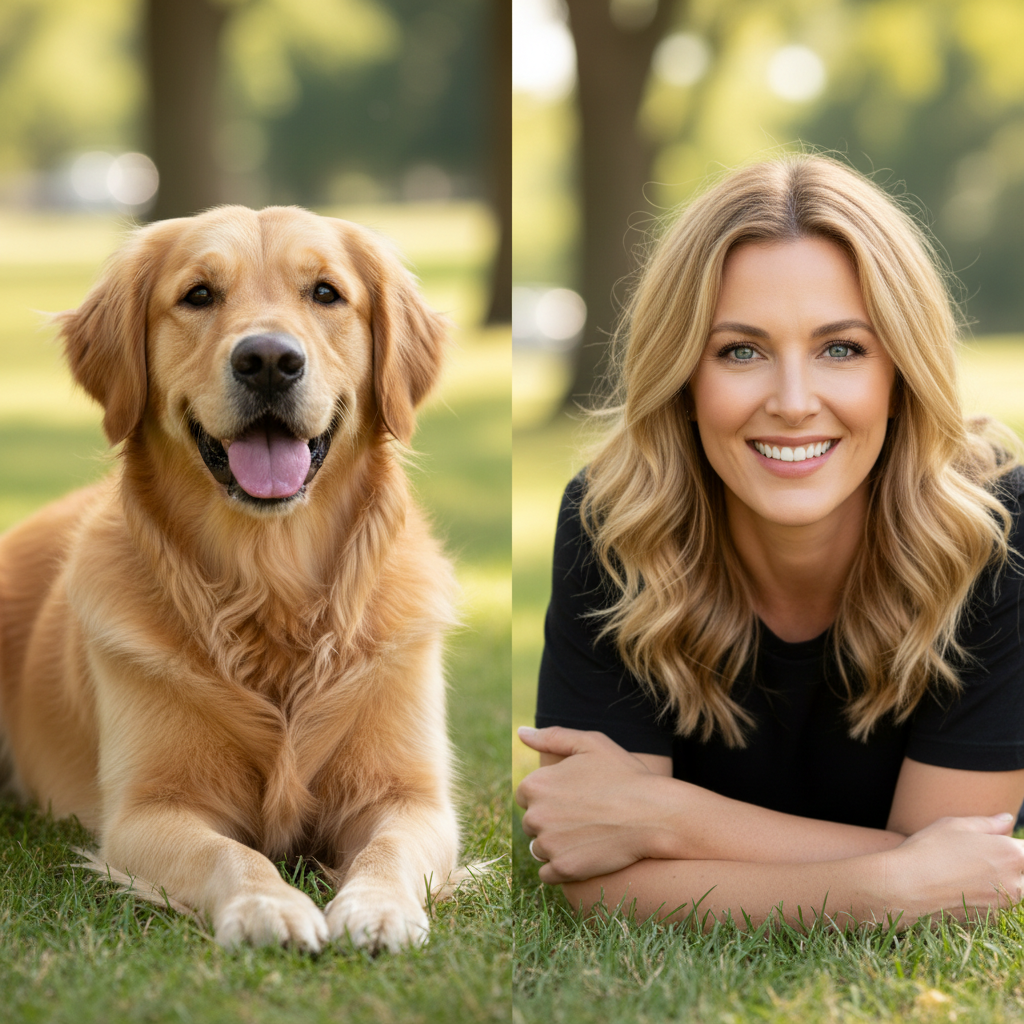
Pet to Human
FunSee what your pet would look like as a human! Matches personality, expression, and distinctive features.
Transform this pet into a realistic human person. Keep the same pose and expression. Match eye color and fur pattern to hair color/style. Preserve the personality visible in the photo, photorealistic style.
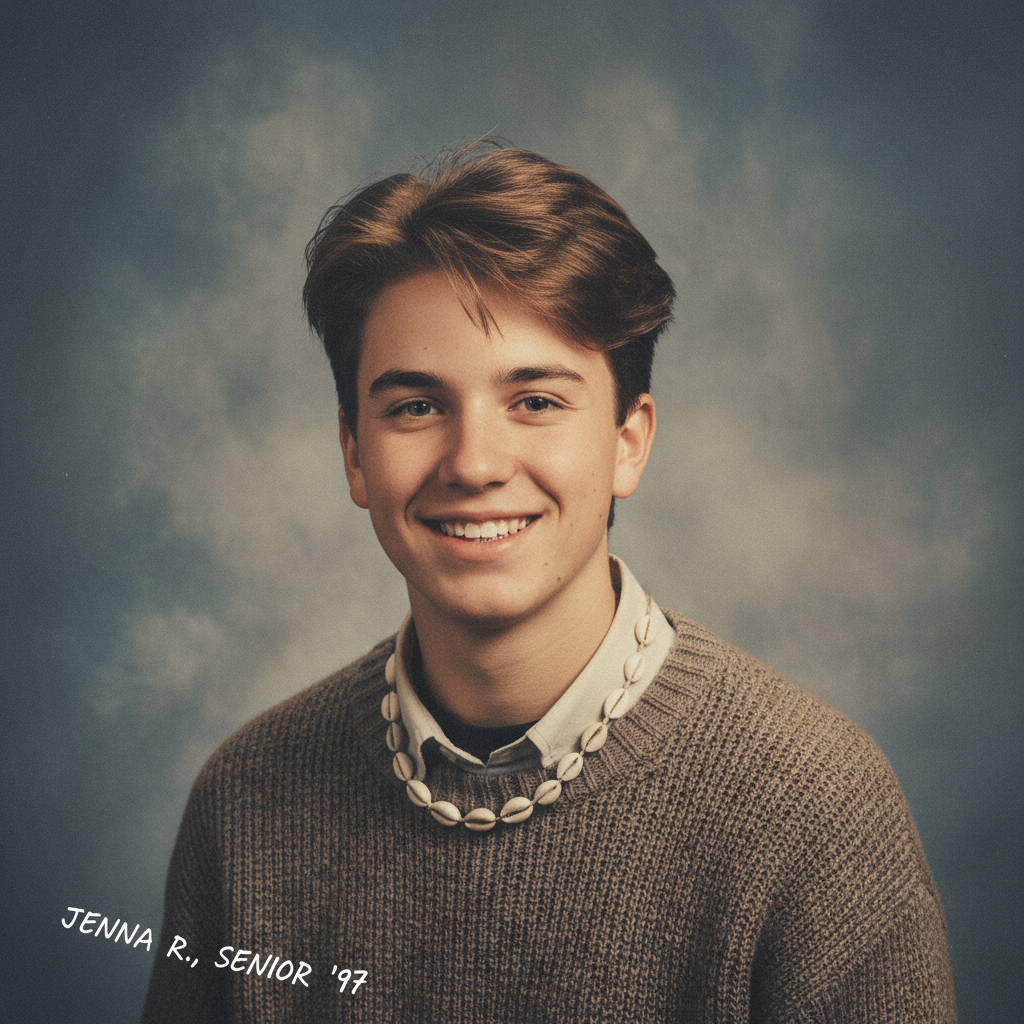
90s Yearbook
NostalgicTravel back to the 90s with authentic yearbook photo style. Classic blue backdrop, vintage vibes.
Transform into a 1990s high school yearbook photo. Classic blue-gray studio backdrop, soft diffused lighting, vintage film grain, 90s hairstyle, warm nostalgic tones, authentic school photo aesthetic.
How to use these prompts
Copy the prompt
Click the copy button on any prompt card to copy it to your clipboard.
Replace placeholders
Replace any [bracketed text] with your specific details.
Iterate one change at a time
If results aren't perfect, change only one element per attempt.
Portrait & Headshot Prompts
Professional portraits for LinkedIn, resumes, and personal branding
Professional Headshot (Natural)
Perfect for LinkedIn profiles, company websites, resumes, and professional bios. Creates a polished but natural-looking headshot.
Professional headshot photo. Keep the same person and facial features. Neutral background, soft studio lighting, realistic skin texture, subtle retouch, sharp focus on eyes, head and shoulders framing, no heavy filters, no text, no watermark
LinkedIn Profile Photo
Optimized for LinkedIn's circular crop. Creates an approachable, trustworthy impression for networking.
Professional LinkedIn headshot, friendly approachable expression, soft smile, [indoor/outdoor] setting with blurred background, natural daylight or soft studio lighting, business casual attire implied, keep the same person, preserve facial features, sharp focus, clean composition, no text
Corporate Executive Portrait
For C-suite executives, board members, and leadership team pages. Conveys authority and professionalism.
Executive corporate portrait, formal professional appearance, confident expression, clean neutral background, Rembrandt lighting for subtle drama, keep the same person exactly, preserve all facial features, sharp focus, high-end retouching that keeps natural texture, no text, no watermark
Creative Professional Headshot
For creative professionals, designers, artists, and those in creative industries who want to show personality.
Creative professional headshot, slightly unconventional angle or composition, colorful or textured background, personality-driven expression, modern aesthetic, keep the same person, preserve facial identity, artistic but professional lighting, sharp focus, no text
Product Photography Prompts
E-commerce ready images for Amazon, Shopify, and catalogs
Pure White Background Product
Standard e-commerce main image. Works for Amazon, Shopify, eBay, and any marketplace requiring white background.
Replace the background with pure white (#FFFFFF). Keep the product completely unchanged. Add subtle soft shadow underneath for depth. Studio product photography, even lighting from multiple angles, sharp focus on all product details, e-commerce ready, centered composition, no text, no watermark
Lifestyle Product Scene
For social media marketing, brand storytelling, and creating desire. Shows the product in context of use.
[Product] in aspirational lifestyle setting, natural daylight through large window, minimalist Scandinavian interior, wooden or marble surface, complementary props that don't distract, shallow depth of field focusing on product, warm color temperature, Instagram-worthy composition, no text overlay
Premium Product Hero Shot
Hero images for landing pages, advertising, and premium brand positioning.
Premium product photography of [product], dramatic studio lighting with soft gradients, reflective surface beneath, subtle rim lighting to define edges, high-end commercial aesthetic, keep product unchanged, ultra-sharp details, luxury brand feel, no text, no distractions
Food Photography Style
For restaurants, food brands, recipe blogs, and food delivery apps.
Appetizing food photography of [food item], overhead or 45-degree angle, natural daylight from side, fresh ingredients visible, rustic wooden or marble surface, complementary garnish and props, vibrant natural colors, slight steam or freshness indicators, no text, commercial food photography quality
Creative & Artistic Prompts
Stylized transformations for avatars, social media, and creative projects
3D Figurine / Action Figure Style
Popular for profile pictures, avatars, and playful personal branding. Creates charming collectible-style characters.
Transform into a high-quality 3D figurine or action figure. Pixar/Disney-inspired character design, smooth plastic texture, pastel or vibrant color palette, simple gradient or studio background, cute proportions with slightly larger head, friendly expression, soft ambient occlusion lighting, preserve pose and identity, no text, no watermark
Cinematic Film Look
Transforms everyday photos into movie-like stills. Great for portfolios and social media.
Cinematic color grading with teal and orange palette, 35mm film aesthetic with subtle grain, anamorphic lens flare optional, shallow depth of field, keep subject and composition unchanged, enhanced contrast and atmosphere, dramatic but realistic lighting, no cropping, no text
Vintage Film Photography
For nostalgic social media content, wedding photos, and retro-themed projects.
Vintage 1970s film photography look, warm faded colors, slight vignette, analog film grain, soft focus edges, nostalgic atmosphere, keep subject unchanged, preserve composition, Kodak Portra or Fuji color science, no text, authentic vintage feel
Oil Painting Portrait
For unique gifts, artistic portraits, and creative personal branding.
Classical oil painting portrait style, visible brushstrokes, rich color palette, dramatic chiaroscuro lighting, Renaissance or Impressionist influence, canvas texture visible, keep subject's likeness, artistic interpretation while preserving identity, museum-quality aesthetic, no text
Enhancement & Restoration Prompts
Improve quality, restore old photos, and fix common issues
Photo Restoration & Enhancement
For restoring old family photos, improving low-quality images, and general enhancement.
Restore and enhance the image quality. Keep the subject completely unchanged. Remove noise, scratches, and damage. Improve clarity and sharpness. Natural colors, realistic texture, no over-processing, no plastic skin effect, preserve all original details, no text added
Low Light Photo Fix
Fixes photos taken in dim conditions, evening events, or indoor settings with poor lighting.
Enhance this low-light photo. Reduce noise and grain while preserving detail. Brighten shadows without blowing highlights. Keep subject and colors natural. Improve clarity, add subtle sharpening, maintain realistic look, no over-saturation, no text
Background Blur / Bokeh Effect
Creates professional portrait look by isolating subject from busy backgrounds.
Add natural background blur (bokeh effect) while keeping [subject] in sharp focus. Simulate f/1.4 or f/1.8 aperture depth of field. Soft, creamy bokeh, keep subject unchanged and sharp, realistic focus falloff, no artificial look, no text
Color Correction & White Balance
Fixes photos with incorrect white balance from mixed lighting or camera settings.
Correct color cast and white balance. Make colors look natural and accurate. Remove any yellow, blue, or green tint. Keep subject unchanged, preserve original composition, accurate skin tones if present, professional color grading, no over-saturation, no text
Tips for Customizing These Prompts
Start with the base prompt — Don't modify everything at once. Try the prompt as-is first, then adjust.
Keep the constraints — Phrases like "keep subject unchanged" and "no text" are there for a reason.
Change one variable at a time — If lighting isn't right, only change lighting keywords.
Save what works — When you get a great result, save the exact prompt for future use.
Explore Specialized Collections
Each category has a dedicated page with more templates, detailed explanations, and troubleshooting tips:
Frequently Asked Questions
Quick answers to common questions about using these prompt templates
These are curated, tested prompt templates that work reliably for common use cases. Each prompt follows our 5-step structure (subject, objective, constraints, style, iteration) and includes built-in safeguards to prevent common problems like identity changes or unwanted text.
Yes, you should customize them. Replace any [bracketed text] with your specific details. For example, replace [product] with 'stainless steel water bottle' or [indoor/outdoor] with your preferred setting. Keep the constraint phrases like 'keep subject unchanged' intact.
Start with the category that matches your goal: Portrait & Headshot for people, Product Photography for items you're selling, Creative & Artistic for stylized effects, and Enhancement for improving existing photos. Each category has prompts optimized for that use case.
AI image generators often add unwanted text or watermarks if not explicitly told not to. Including these constraints prevents these common issues. Always keep these phrases in your prompts.
This constraint tells the AI to preserve the core identity of your subject - for people, it keeps their facial features; for products, it keeps the product appearance. Without this, the AI might alter your subject in unexpected ways.
Yes, but carefully. You can take lighting from one prompt and style from another, but avoid mixing conflicting elements. For example, don't combine 'cinematic dramatic lighting' with 'even studio lighting' - pick one direction.
Common issues: 1) Too many conflicting instructions, 2) Missing important constraints, 3) Changing multiple variables at once. Try simplifying the prompt, ensure constraints are present, and change only one element per iteration.
For image-to-image (editing), keep all 'preserve' and 'unchanged' constraints. For text-to-image (generating new), you can remove those and focus on the descriptive elements. The core structure works for both.
Yes! We have dedicated pages with deeper collections: Headshot Prompts (10+ templates with lighting techniques), Product Photo Prompts (e-commerce specific), and 3D Figurine Prompts (avatar styles). Check the links in the 'Explore Specialized Collections' section.
Yes! You get 3 free credits after signup — just open the generator and try any prompt. Want more? Sign up (email only, no credit card) to receive 3 free credits. That's 3 free credits total to test different prompts before upgrading.
API access is not offered at this time. Nano Banana is available through the web interface only.