Nano Banana Headshot Prompts
Copy-paste headshot prompts for natural, professional portraits. Includes constraints to preserve identity and avoid over-processed results.
Use the newer portrait and photo tools
This prompt guide is kept for reference. For the current workflow, use the photo enhancer or image-to-image tool with your uploaded portrait.
AI Photo Enhancer
Improve portrait clarity, skin detail, and low-resolution profile photos.
Open toolImage to Image AI Generator
Create headshot and profile-photo variations from an uploaded portrait.
Open toolAI Background Changer
Swap portrait backgrounds for studio, office, social, or brand-color looks.
Open toolUse these headshot prompts to generate professional, natural-looking portraits. The key to great AI headshots: always include identity constraints ("keep the same person"), specify realistic skin texture, and control lighting carefully.
Important
Only use photos you have rights to edit. For personal headshots, use your own photos. For client work, ensure proper consent.
When AI headshots work best
AI-generated headshots are ideal for specific situations. Understanding when to use them helps you get the best results:
Great for:
- LinkedIn profile updates when you can't schedule a photographer
- Quick team page photos with consistent styling
- Enhancing existing good photos (lighting, background)
- Testing different styles before a professional shoot
Consider alternatives for:
- Legal documents requiring authentic photography
- High-stakes executive portraits for major publications
- Situations requiring verified, unedited photos
Understanding lighting for headshots
Lighting is the most important factor in headshot quality. Here are the main styles you can request:
Soft Studio Lighting
Even, flattering light that minimizes shadows. Standard for corporate headshots.
soft studio lighting, even illuminationRembrandt Lighting
Creates a triangle of light on the cheek. Adds subtle drama while remaining professional.
Rembrandt lighting, subtle shadow on one sideNatural Daylight
Soft, outdoor light. Works well for approachable, casual professional images.
natural daylight, outdoor soft lightRing Light
Creates catchlights in eyes and even facial lighting. Popular for social media.
ring light, even face lighting, catchlightsAI headshot examples
See what's possible with the right prompts. These examples show different lighting styles and professional looks.
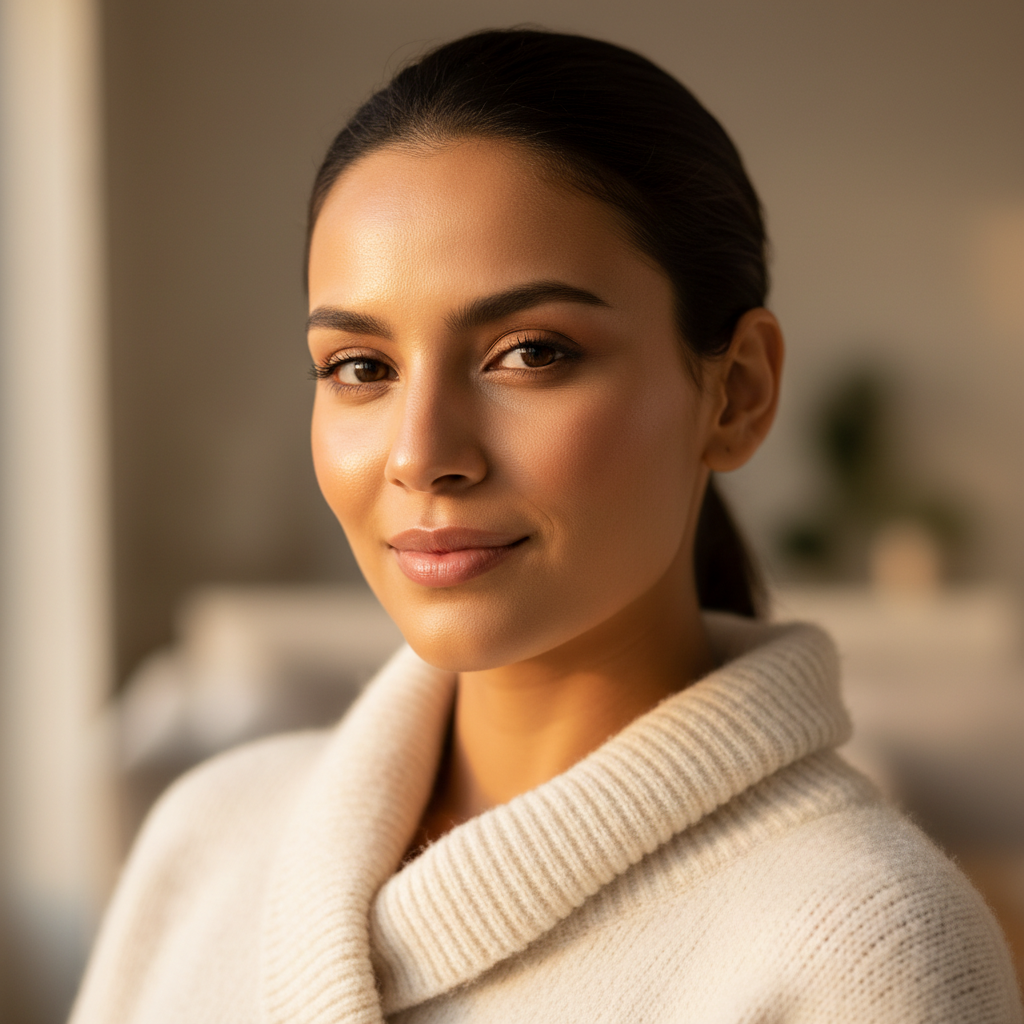
Natural Light Portrait
Soft golden hour window light with warm tones. Perfect for LinkedIn and personal branding.
View prompt used →
A photorealistic close-up portrait of a confident young professional woman, warm olive skin, soft brown eyes with catchlights, subtle knowing smile, immaculate natural makeup with dewy skin. Wearing a luxurious cream cashmere sweater. Soft golden hour window light, 85mm portrait lens, f/1.8, creamy bokeh background in warm neutral tones. High-end LinkedIn profile photo quality, Vogue-inspired lighting.
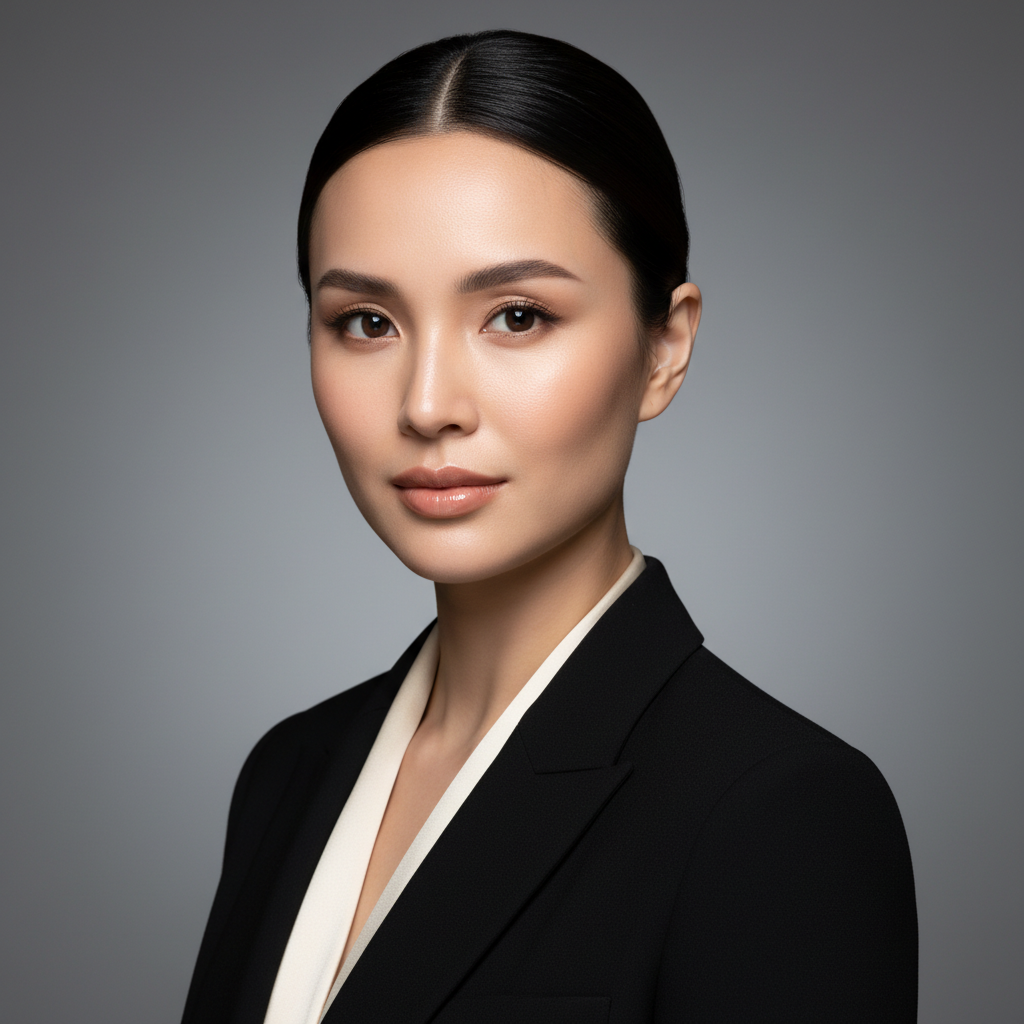
Studio Portrait Style
Classic Rembrandt lighting with gray gradient background. Ideal for corporate and executive profiles.
View prompt used →
A stunning professional headshot of a sophisticated businesswoman with sharp cheekbones and elegant features. Flawless porcelain skin, soft contour makeup, glossy nude lips, sleek dark hair styled back. Wearing a tailored black blazer over a silk blouse. Classic Rembrandt lighting with soft fill, dramatic but flattering shadows. Clean gray gradient studio background. Ultra-sharp focus on eyes, shallow depth of field. Editorial glamour meets corporate elegance.
Professional headshot prompts
Copy these tested prompts and customize them for your needs. Each includes essential constraints for natural results.
Standard Professional Headshot
The go-to prompt for LinkedIn, company websites, and professional bios. Creates polished but authentic-looking headshots.
Professional headshot photo. Keep the same person and facial features. Neutral gray background, soft studio lighting, realistic skin texture with natural pores, subtle retouch only, sharp focus on eyes, head and shoulders framing, confident but approachable expression, no heavy filters, no text, no watermark
LinkedIn Profile Optimized
Optimized for LinkedIn's circular profile display. Creates trust and approachability for networking.
Clean LinkedIn-style headshot, friendly approachable expression with natural smile, neutral or slightly blurred office background, soft even lighting, realistic skin texture, subtle professional retouch, keep the same person exactly, preserve all facial features, sharp focus, circular crop friendly composition, no text
Corporate Executive Portrait
For C-suite executives, board members, and leadership team pages. Conveys authority while remaining personable.
Executive corporate headshot, formal professional appearance, confident composed expression, clean neutral background, Rembrandt lighting for subtle dimension, keep the same person exactly, preserve all facial features, sharp focus on eyes, high-end retouching that maintains natural skin texture, no heavy makeup look, no text, no watermark
Outdoor Natural Headshot
For creative professionals, startups, and those wanting a less formal but still professional look.
Natural outdoor professional headshot, soft daylight during golden hour, blurred nature or urban background, keep the same person and facial identity, realistic skin texture with natural imperfections, gentle warm tones, relaxed professional expression, shallow depth of field, no text, no heavy color grading
Team Page Consistency
When you need consistent-looking headshots across a team page. Ensures visual harmony.
Professional team page headshot, neutral light gray background (#E5E5E5), soft even studio lighting, consistent framing head and shoulders, keep the same person exactly, natural skin texture, subtle uniform retouch, friendly professional expression, sharp focus, no text, match corporate style
Fix Over-Smoothed Skin
When AI over-smoothed the skin. This prompt restores natural texture while keeping a polished look.
Restore natural skin texture and pores to this headshot. Keep the same person unchanged. Remove any plastic or airbrushed appearance. Maintain subtle retouch but with visible natural texture. Realistic pore detail, natural imperfections, soft lighting, no synthetic look, no text
Speaker/Author Portrait
For book covers, speaking profiles, and thought leadership content. More dynamic than standard corporate.
Professional speaker headshot, dynamic but approachable expression, clean gradient or solid background, dramatic but flattering lighting, keep the same person exactly, natural skin with professional retouch, sharp focus on eyes, confidence conveying pose, slight angle for interest, no text, high resolution detail
Creative Professional Headshot
For designers, artists, marketers, and those in creative industries who want to show personality.
Creative professional headshot, slightly unconventional angle, colorful or textured interesting background, personality-driven genuine expression, modern artistic aesthetic, keep the same person and identity, natural skin texture, artistic but professional lighting, unique composition, no text, no watermark
Common issues and how to fix them
Face looks different (identity drift)
The AI changed facial features, making the person look different.
Fix: Add stronger identity constraints: "keep the same person exactly", "preserve all facial features", "no face changes", "maintain identity"
Skin looks plastic or over-smoothed
The AI removed too much texture, creating an artificial doll-like appearance.
Fix: Remove words like "flawless" or "perfect". Add: "natural skin texture", "visible pores", "realistic imperfections", "no plastic skin"
Lighting too harsh or flat
Unflattering shadows or lack of dimension in the face.
Fix: Specify lighting style: "soft studio lighting", "Rembrandt lighting", or "natural diffused daylight". Add "flattering angles"
Wrong framing or composition
Subject too close, too far, or awkwardly cropped.
Fix: Be specific: "head and shoulders framing", "centered composition", "rule of thirds", "no cropping face"
Best practices checklist
Frequently Asked Questions
Common questions about creating professional AI headshots
Always include strong identity constraints in your prompt: 'keep the same person exactly', 'preserve all facial features', 'no face changes', and 'maintain identity'. The more explicit you are, the better the AI preserves your appearance.
This happens when the AI over-smooths the texture. Avoid words like 'flawless', 'perfect', or 'smooth skin'. Instead, use 'natural skin texture', 'visible pores', 'realistic imperfections', and 'subtle retouch only'. This keeps the professional look while maintaining authenticity.
For most corporate uses, 'soft studio lighting' provides even, flattering illumination. For more dimension, try 'Rembrandt lighting' which adds subtle drama. For approachable, casual looks, 'natural daylight' or 'golden hour' works well. Always specify your preference in the prompt.
Yes! The 'Team Page Consistency' prompt is designed for this. Use the same prompt for all team members, specifying the exact background color (e.g., '#E5E5E5') and lighting style. Save the working prompt and reuse it for each person.
Upload at least 512x512 pixels for good results. Higher resolution (1024x1024 or above) gives better detail. Images under 512px may produce blurry or low-quality outputs. The subject's face should be clearly visible and take up a reasonable portion of the frame.
Specify exactly what you want: 'head and shoulders framing', 'centered composition', 'rule of thirds', or 'no cropping of face'. If the framing is still wrong, try adjusting your source image crop before uploading.
Yes! Specify the exact color you want: 'neutral gray background', 'pure white background (#FFFFFF)', or 'dark navy background'. You can also request 'blurred office background' or 'outdoor background with bokeh' for environmental headshots.
Use the 'LinkedIn Profile Optimized' prompt which includes 'circular crop friendly composition' and 'approachable expression'. LinkedIn displays profiles as circles, so ensure the face is centered with some space around it.
AI headshots are generally acceptable for enhancing your existing photos (lighting, background, minor improvements). Most platforms accept them for personal profiles. However, avoid using them where authentic, unedited photos are legally required (e.g., ID documents). Be transparent when asked about photo origins.
Yes! You get 3 free credits after signup — just open the generator and try it. Want more? Sign up (email only, no credit card) to receive 3 free credits. That's 3 free credits total to test different headshot styles before upgrading.
With a well-structured prompt, most users get good results in 1-3 attempts. If the first result isn't right, change only one element (lighting, expression, or background) per iteration. Systematic adjustments are more effective than rewriting the entire prompt.
API access is not offered at this time. Nano Banana is available through the web interface only.
Related Prompt Templates
Explore more professional AI image generation templates